Equipment Set
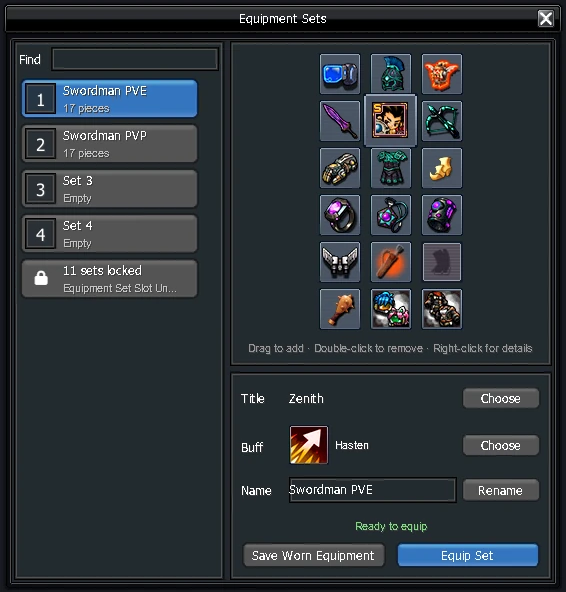
An Equipment Set saves a full loadout (gear and a title) so you can switch builds, for example PvE and PvP, with one button. You have 1 set; each  Equipment Set Slot Unlocker unlocks one more, up to 15. Sets you haven't unlocked yet are grouped at the bottom of the list.
How it works
- Press K, open the Motion tab and click the Equipment Set icon
 .
- Drag items from your inventory onto the set window.
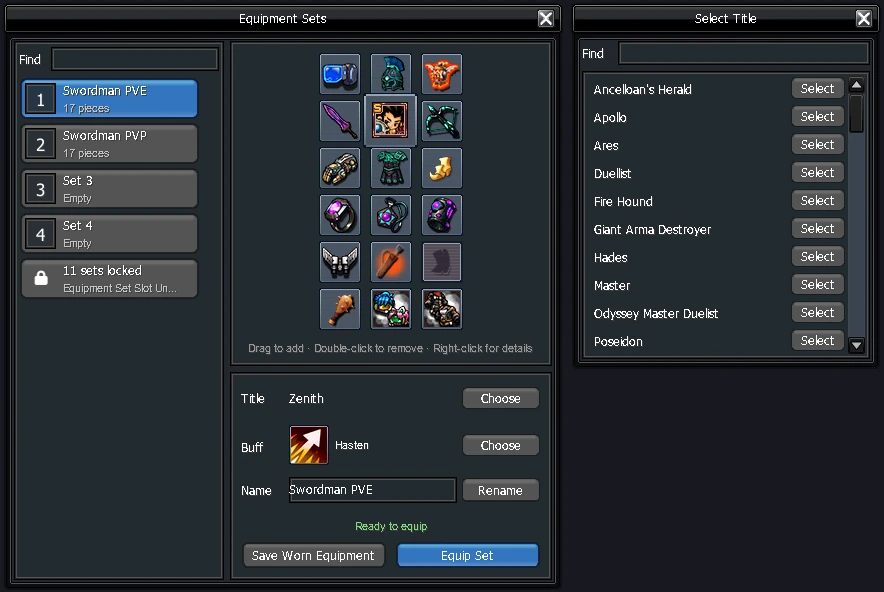
- To save a title, press Choose next to Title and pick one of your titles. Buff does the same for your Multiverse artefact buff.
- Press Equip Set to switch. Each unlocked set has its own icon you can put on your skill bar.
warning
Items in your Costume or Card inventory are ignored, so they aren't saved or swapped.