Options Window

The Options window holds the game's toggles, sorted into categories and searchable by name.
Open it with the gear icon at the bottom right → Game configuration → Options. Pick a category on the left (or All), search in the top-left box, and click the square next to an option to turn it on or off.
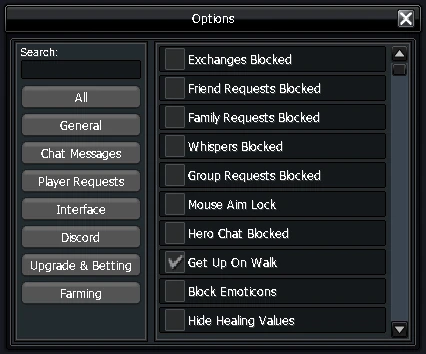
Every option by category
General5
Mouse Aim LockClicking a target then hovering your cursor over it makes your cursor follow the target as it moves.
Get Up On WalkTrying to move while sitting automatically stands your character up and moves.
Safe Equipment SellingBlocks selling upgraded equipment to merchants — weapons, armor, specialists, gloves and shoes.
Disable Box ConfirmationOpen boxes without confirming each one individually.
Don't Target Boss On HP Bar ClickClicking a raid boss's HP bar no longer selects the boss as your target.
Chat Messages4
Whispers BlockedOther players are unable to whisper you.
Hero Chat BlockedYou won't see hero messages from other players.
Hide Item Drops MessagesItem drop messages are hidden.
Hide Gold Drops MessagesGold drop messages are hidden.
Player Requests6
Exchanges BlockedExchange requests are blocked.
Friend Requests BlockedFriend requests are blocked.
Family Requests BlockedFamily invites are blocked.
Group Requests BlockedGroup requests are blocked.
Miniland Invites BlockedMiniland invites are blocked.
Duel Requests BlockedDuel requests are blocked.
Interface9
Block EmoticonsAll emoticons are hidden.
Hide Healing ValuesGreen healing numbers are hidden.
Disable Blinking Buff IconsBuff icons no longer blink when about to expire.
Hide HatYour character's hat is hidden.
Lock UI PositionLocks UI element positions. When unlocked, a small blue square appears next to each element — click it to drag the element.
Hide Skill CooldownsThe numeric skill-cooldown display is hidden.
Hide HP/MP LabelsNumeric HP/MP values of targets are hidden.
Show Monsters on MinimapShows all monsters on the minimap.
Show Monsters on Minimap (Rifts)Shows all monsters on the minimap — inside Rifts only.
Discord1
Discord Rich PresenceDisplays your in-game status on your Discord profile.
Upgrade & Betting2
Safe BettingBlocks betting equipment unless a protection amulet is equipped.
Safe UpgradeBlocks upgrading weapons and armor past +3 without a scroll of protection.
Farming1
AutoLoot in Solo RiftsMonster item drops in a solo rift are collected into your inventory automatically.