Wardrobe

The Wardrobe shows the looks you choose while you keep your strongest gear equipped. Unlock it once with  Wardrobe Key (30 Days).
How it works
Open your character window (P) and click the orange button on the right.
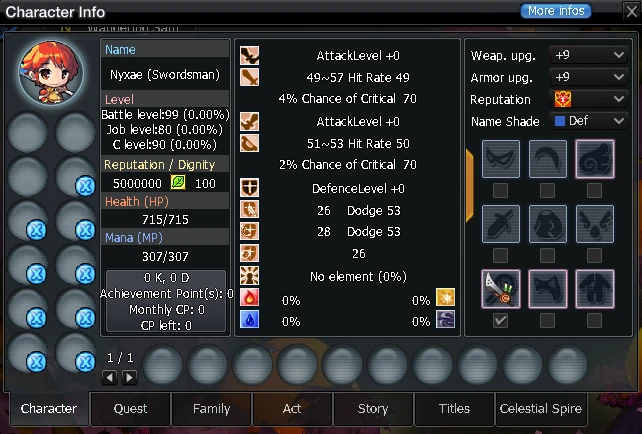
- Show a look: put an item or skin in its Wardrobe slot and tick the box. A regular weapon in the weapon slot replaces both the weapon and the weapon skin look.
- Hide a look: tick the box of an empty slot. This doesn't work for the main weapon, secondary weapon or armour.
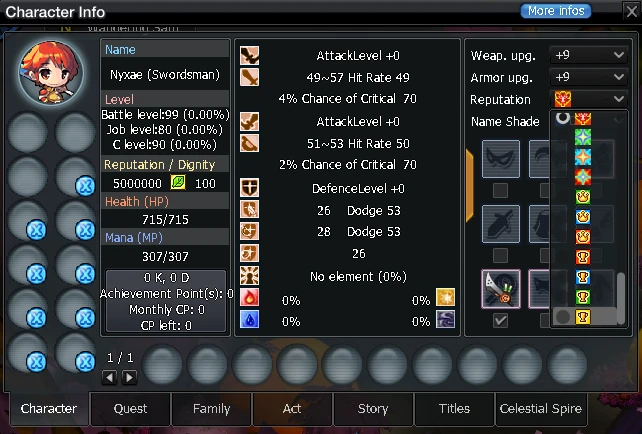
- Reputation: pick any reputation icon up to your own. The monthly ranking icons (Monthly #1, #2, #3 and Top 10) sit at the end of the list; you can pick one while you hold that rank this month. Your real reputation still shows in your character info.
- Upgrade: show your weapon and armour at any upgrade level up to their own: the weapon up to your higher one of main and secondary weapon, the armour up to your armour.