Swapper
Every wing, minipet, skin and chroma you use on a Specialist card is remembered by that card. The Swapper switches between them, for looks and for buffs.
How it works
- Wear the Specialist card. To change wings it must be +1 or higher.
- Use a wing, minipet, skin or chroma on it. The card keeps it for good; you never use the item again.
- Click the Swapper button (the wing icon next to the minimap) and pick what to wear.
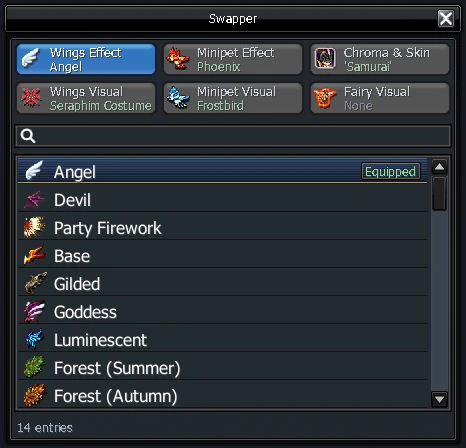
The Swapper has six tabs: looks tabs (wings, minipet, SP skins and chromas, fairy) and buff tabs (which wing and which minipet give their stats). You can wear one wing's look with another wing's buffs. Only Effect minipets give stats. The Fairy Visual tab puts a fairy from your inventory in your Wardrobe fairy slot, so it sets your fairy's look; it needs the Wardrobe key.
Swaps have cooldowns: 5s between look swaps, 15s between buff swaps, and you can't swap for 30s after your last skill.
Storing a Specialist card in a card holder removes every wing, skin and minipet used on it.
When you win  Arena Wings in Rainbow Battle or
 Phoenix Blaze Wings from the God's Altar, you can wear them through the Swapper for the following month.
Try before you buy
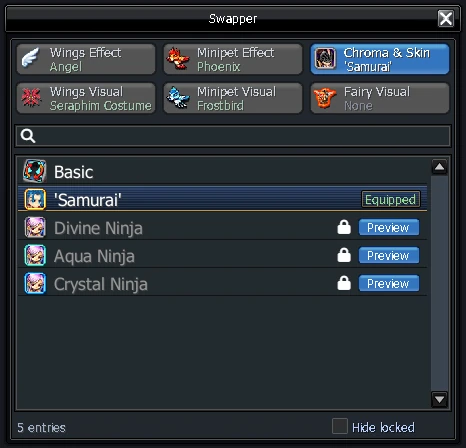
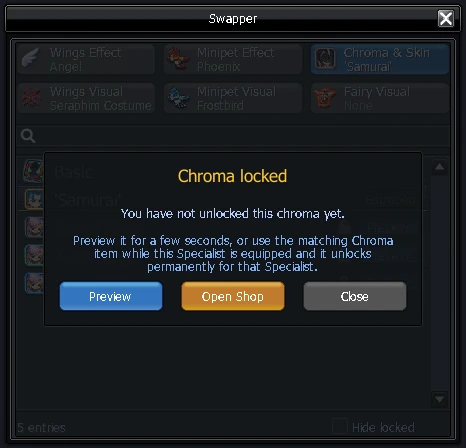
On Chroma & Skins and Wings Visual, looks you don't own yet are listed with a lock. Press Preview to wear one for a few seconds, or click it and choose Open Shop to go straight to its shop page.
Swapper Medal

 Purchase · 500 OC
The Medal unlocks these looks in the Wings tab. It gives looks only: for a wing's buffs, use that wing on the Specialist card you want.
 Angel Wings
 Devil Wings
 Fire Wings
 Ice Wings
 Archangel Wings
 Archdaemon Wings
 Blazing Fire Wings
 Frosty Ice Wings
 Golden Wings
 Onyx Wings
 Fairy Wings
 Mega Titan Wings
 Zephyr Wings
 Lightning Wings
 Blade Wings
 Crystal Wings
 Petal Wings
 Lunar Wings
 Party Firework Wings
 Party Sparkler Wings
 Base Wings